If you want your website to rank higher on Google and attract more of the right visitors, on-page SEO is one of the best places to start. From optimizing your page titles and content to improving user experience and keyword placement, on-page SEO helps search engines better understand your website and the value it provides.
In this guide, we’ll walk through what on-page SEO is, why it matters, and a practical on-page SEO checklist you can use to optimize your website for better visibility and rankings.
What Is On-Page SEO?
On-page SEO refers to the process of optimizing the content and elements on your website pages to help search engines understand what your content is about and improve your chances of ranking higher in search results.
This includes things like optimizing your page titles, headings, keywords, images, URLs, internal links, and content structure. It also involves creating helpful, high-quality content that provides a good experience for your visitors.
Unlike off-page SEO, which focuses on factors outside your website (such as backlinks), on-page SEO gives you direct control over how your website is optimized. The better your on-page SEO, the easier it is for search engines like Google to understand your content and connect it with the people searching for it.
Why Is On-Page SEO Important?
On-page SEO is important because it helps search engines understand your website content and determine when to show it in search results. Without proper optimization, even great content can struggle to get discovered.
Strong on-page SEO can help improve your website’s visibility, attract more organic traffic, and create a better experience for your visitors. When your pages are clear, well-structured, and relevant to what people are searching for, search engines are more likely to rank them higher.
Here are a few key benefits of on-page SEO:
- Improves search visibility: Helps your website appear in search results for relevant keywords and topics.
- Attracts the right audience: Brings in visitors who are actively searching for what you offer.
- Creates a better user experience: Organized content, clear headings, and optimized images make your website easier to navigate and read.
- Increases credibility and trust: A well-optimized website feels more professional and helpful to both visitors and search engines.
- Supports long-term growth: Unlike paid ads, SEO can continue bringing traffic to your website over time.
The good news? Many on-page SEO improvements are simple to implement once you know what to look for, which is exactly what we’ll cover in the checklist below.
On-Page SEO Checklist
1. Choose a Target Keyword
Before optimizing any page or blog post, start with a clear target keyword. A target keyword is the main word or phrase you want your page to rank for in search engines.
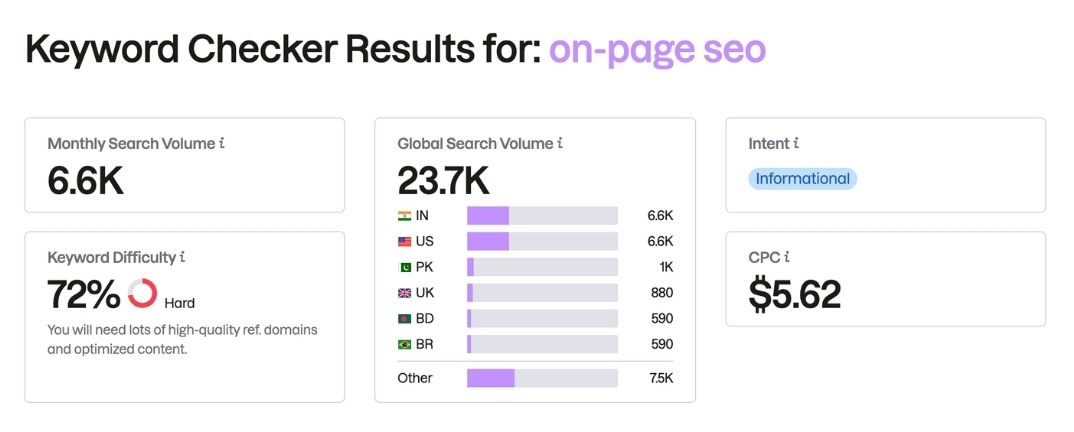
For example, if someone searches for “on-page SEO”, you want Google to understand that your page is relevant to that topic.
As a best practice, focus on one primary keyword per page and include a few closely related keywords or phrases that naturally support the topic. Trying to target too many unrelated keywords on a single page can confuse search engines and make your content feel unfocused.
When choosing a keyword, think about what your audience is actually searching for and the intent behind the search. Are they looking for information, a tutorial, a service, or a solution to a problem?
You can use keyword research tools like Google Keyword Planner, Ubersuggest, or Semrush to discover keyword ideas, search volume, and related terms. Even Google’s search suggestions can give you valuable insight into what people are searching for.
2. Create High-Quality Content
High-quality content is one of the most important parts of on-page SEO. Search engines want to rank content that is helpful, relevant, and valuable to the person searching.
Instead of focusing on a specific word count, focus on creating content that fully answers your audience’s questions or solves their problem. In many cases, longer content performs well because it provides more depth, but quality should always come before quantity.
When creating content, ask yourself:
- Does this content answer the reader’s question?
- Is it clear, helpful, and easy to understand?
- Does it provide real value or actionable insights?
- Is the information accurate and up to date?
To improve readability, break up long sections of text with headings, bullet points, short paragraphs, and visuals where appropriate. Well-structured content is easier for both visitors and search engines to understand.
Remember, great SEO is not just about ranking higher; you should always aim to create content that genuinely helps the people who land on your website.
3. Use SEO-Friendly URLs for Better On-Page SEO
Your page URL plays a small but important role in on-page SEO. A clean, descriptive URL helps search engines understand what your page is about and makes it easier for visitors to know what they can expect.
Whenever possible, keep your URLs short, clear, and relevant to the page’s content.
For example:
Good URL:
yourwebsite.com/on-page-seo-checklistNot ideal:
yourwebsite.com/post123?id=456Here are a few best practices for SEO-friendly URLs:
- Include your target keyword when it makes sense naturally.
- Keep URLs short and descriptive rather than overly long or complicated.
- Use hyphens (-) instead of underscores (_) to separate words.
- Avoid unnecessary numbers, dates, or random characters unless they are relevant to the content.
- Keep URLs readable for humans, not just search engines.
A simple, keyword-rich URL can help improve clarity and create a better experience for both visitors and search engines.
4. Put Your Keyword in the Title Tag
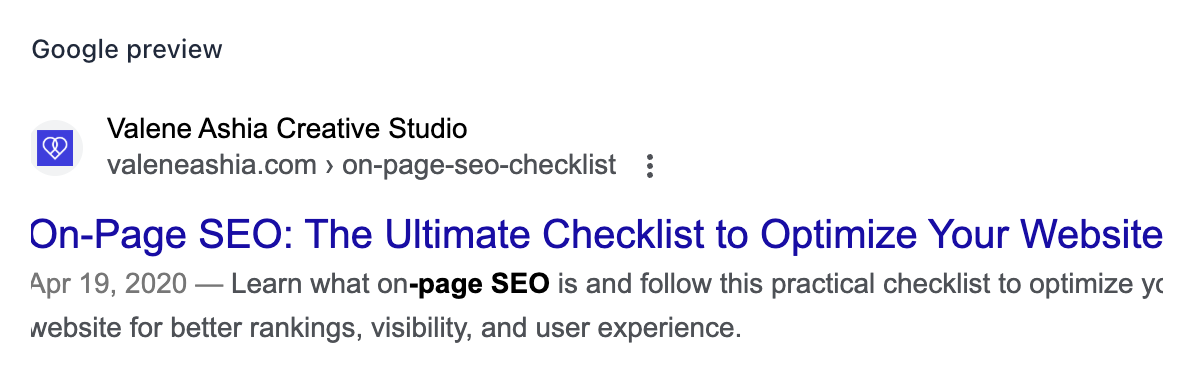
Your title tag is one of the most important on-page SEO elements because it helps search engines better understand your content and its purpose. It is also often the clickable headline people see in Google search results.
Including your target keyword in the title tag can improve your chances of ranking for that topic. As a best practice, try to place your keyword naturally near the beginning of the title when possible.
For example, for this post, instead of:
“A Helpful Guide to Optimizing Your Website”
We used:
“On-Page SEO: The Ultimate Checklist to Optimize Your Website”
In addition to including your keyword, make sure your title is clear, compelling, and relevant to what readers are searching for. A strong title can improve click-through rates by encouraging more people to visit your website.
Here are a few title tag best practices:
- Include your target keyword naturally.
- Keep titles clear and descriptive.
- Make it compelling enough to encourage clicks.
- Avoid keyword stuffing.
- Keep title length reasonable (generally around 50–60 characters when possible).
Think of your title tag as your page’s first impression; it should clearly communicate what your content is about while encouraging people to click.
5. Add Modifiers to Your Title
Adding modifiers to your page title can make your content more specific, relevant, and appealing to searchers. Modifiers are descriptive words or phrases that help clarify what your content offers and can improve click-through rates in search results.
Common title modifiers include words like:
- Checklist
- Guide
- Beginner’s Guide
- Tips
- Best Practices
- Step-by-Step
- Easy
- Complete
- How To
For example, instead of simply using:
“On-Page SEO”
We made the title more compelling and descriptive:
“On-Page SEO: The Ultimate Checklist to Optimize Your Website”
We could have also gone with:
“What Is On-Page SEO? A Beginner-Friendly Guide”
Modifiers can help match search intent by signaling exactly what readers can expect from your content. Someone searching for a guide may want education, while someone searching for a checklist may be looking for practical steps.
The key is to use modifiers naturally and choose ones that accurately reflect the content on your page.
6. Write Meta Descriptions for Better On-Page SEO
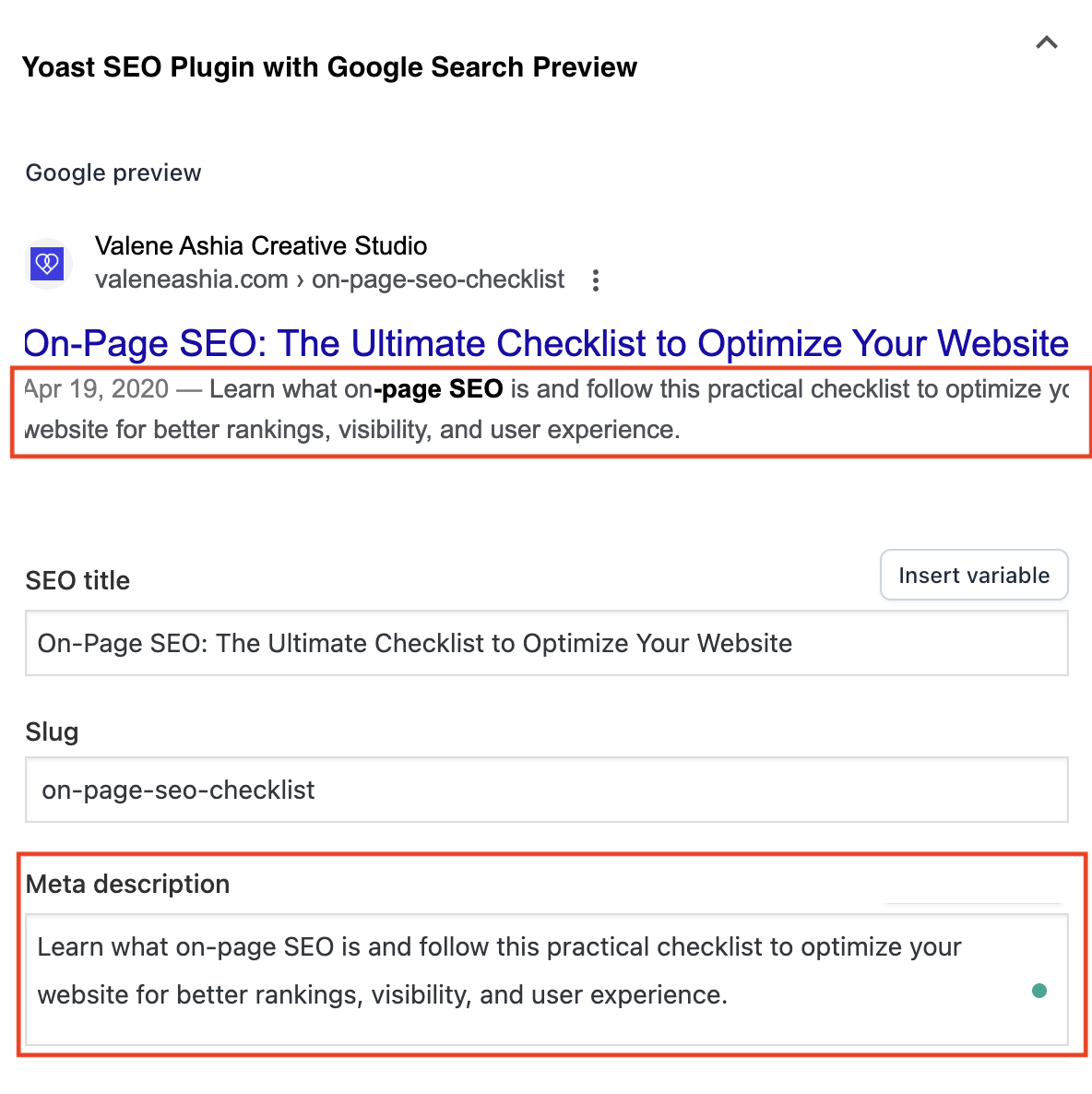
A meta description is the short summary that often appears below your page title in Google search results. While meta descriptions are not a direct ranking factor, they can influence whether someone clicks on your content.
A strong meta description gives readers a quick preview of what your page is about and encourages them to visit your website.
For example:
Page Title:
On-Page SEO: The Ultimate Checklist to Optimize Your Website
Meta Description:
Learn what on-page SEO is and follow this practical checklist to optimize your website for better rankings, visibility, and user experience.
When writing a meta description, keep these best practices in mind:
- Include your target keyword naturally.
- Clearly explain what the page is about.
- Give readers a reason to click.
- Keep it concise (generally around 150–160 characters).
- Avoid keyword stuffing or vague descriptions.
Think of your meta description as a mini advertisement for your content; it should quickly communicate value and encourage people to click through to your website.
7. Use Keywords in Subheadings
Subheadings help organize your content and make it easier for both readers and search engines to understand what your page is about. Including keywords in your subheadings can reinforce your topic and improve content relevance, but it should always feel natural.
For example, this blog post is about on-page SEO, so our headings look like this:
H2: What Is On-Page SEO?
H2: Why Is On-Page SEO Important?
H2: On-Page SEO Checklist
Under our checklist section, we included H3 subheadings like:
H3: Choose a Target Keyword
H3: Create High-Quality Content
H3: Optimize Your Title Tag
This type of structure helps search engines better understand your content while also making your page easier for readers to scan and navigate.
A few best practices for subheadings:
- Use clear, descriptive headings.
- Include keywords naturally where relevant.
- Break up large sections of text for better readability.
- Use heading hierarchy properly (H1, H2, H3, etc.).
Remember, headings are not just for SEO; they improve the overall user experience by making your content easier to read and navigate.
8. Include Your Keyword in the Introduction
Including your target keyword in the introduction can help search engines quickly understand your content. It also reassures readers that they’ve landed on the right page.
As a best practice, try to mention your primary keyword naturally within the first paragraph or two of your content. The key word here is naturally, your writing should still sound clear and conversational, not forced or repetitive.
For example, our target keyword is “on-page SEO,” so our introduction goes something like this:
“If you want your website to rank higher on Google and attract more of the right visitors, on-page SEO is one of the best places to start.”
This helps establish the topic early while keeping the content helpful and easy to read.
Avoid overusing your keyword or forcing it into every sentence. Search engines are smart enough to understand context, so focus on writing naturally while staying relevant to your topic.
9. Maintain Natural Keyword Distribution
While it is important to include your target keyword throughout your content, it should always feel natural and relevant. Gone are the days of repeating the same keyword over and over in an attempt to rank higher in search results.
Instead of focusing on keyword density, focus on creating content that naturally supports your topic. Use your primary keyword where it makes sense, while also incorporating related words and phrases that help provide context.
For example, in our blog post targeting “on-page SEO,” we naturally include related phrases like:
- SEO best practices
- Optimize your website
- Search engine rankings
- Title tags
- Meta descriptions
- Keyword optimization
Using related terms helps search engines better understand your content while keeping your writing natural and helpful for readers.
A few places where it often makes sense to include your keyword are:
- Your page title
- Introduction
- Subheadings (where relevant)
- Meta description
- Image alt text
- Throughout the content, where it fits naturally
The goal is not to force your keyword into every paragraph, but to create content that feels clear, relevant, and useful to the reader.
10. Optimize Images and Alt Text
Images can make your content more engaging and visually appealing, but they also play an important role in on-page SEO. Properly optimized images can help improve page performance, accessibility, and search visibility.
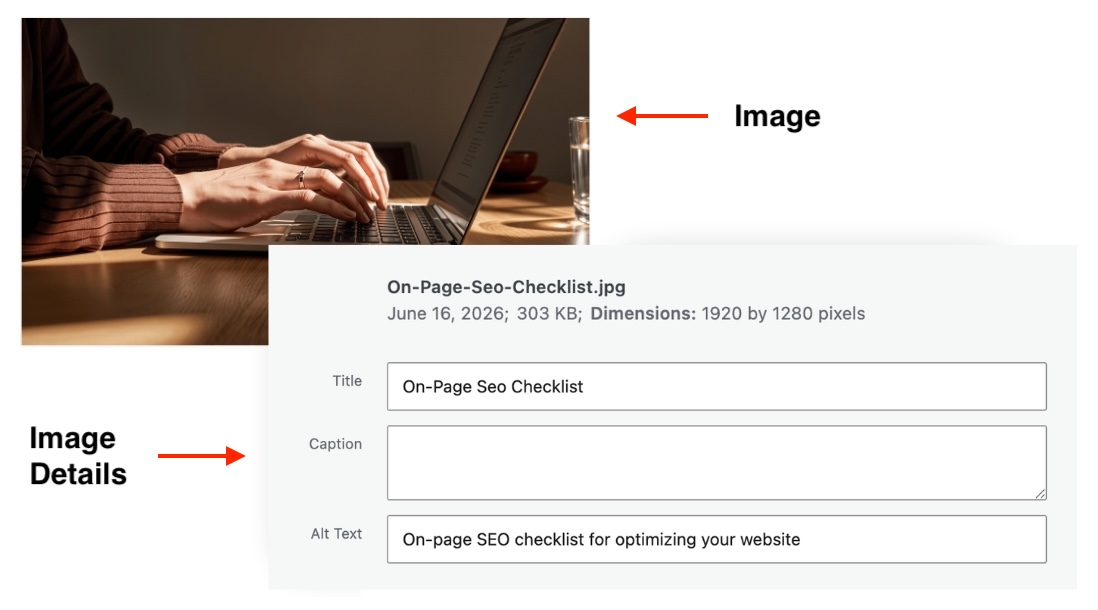
One of the easiest ways to optimize images is to use descriptive file names and add alt text (alternative text). Alt text is a short description of an image that helps search engines understand what the image is about and improves accessibility for people using screen readers.
For example, instead of uploading an image named:
IMG_4829.jpgTry something more descriptive like:
on-page-seo-checklist.jpgYou should also add descriptive alt text. For example:
Not ideal alt text:
“image1”
Better alt text:
“On-page SEO checklist for optimizing website rankings”
Below is an example of how we optimized the featured image for this blog post. Take note of the file name, title, and alt text.
Here are a few image optimization best practices:
- Use descriptive file names.
- Add clear, relevant alt text.
- Compress large images to improve page speed.
- Choose high-quality images that support your content.
- Avoid keyword stuffing in alt text.
Optimized images not only help with SEO, but they also create a better user experience by improving accessibility and page performance.
11. Add Relevant Internal and External Links
Links help search engines better understand your website content and create a stronger experience for your visitors. Including both internal links and external links can strengthen your on-page SEO when used strategically.
Internal links connect one page on your website to another. For example, if you mention SEO-friendly website design in this post, you could link to a related blog post or service page on your website. Internal links help visitors discover more content while helping search engines understand your site structure.
External links (also called outbound links) point to trusted sources outside your website. Linking to relevant, credible resources can help support your content and provide additional value to readers.
For example, if you reference keyword research tools, you might link to their websites for more information.
Here are a few best practices for linking:
- Link to relevant pages on your own website
- Use descriptive anchor text instead of generic phrases like “click here”
- Link to credible, trustworthy sources
- Only add links that genuinely add value to the reader
- Avoid excessive linking that feels distracting or spammy
Thoughtful linking can improve navigation, keep visitors engaged longer, and help search engines better understand the relationships between your content.
12. Encourage Social Sharing
While social media shares are not a direct ranking factor for SEO, sharing your content can help increase visibility, drive traffic to your website, and expand your reach.
When people share your blog posts or website content, it creates more opportunities for others to discover, engage with, and potentially link back to your content. This can indirectly support your SEO efforts over time.
Here are a few ways to encourage social sharing:
- Create helpful, valuable content people want to share.
- Add social sharing buttons to blog posts.
- Use compelling blog titles and images.
- Share your content on platforms like Instagram, Pinterest, Threads, or LinkedIn.
- Repurpose blog content into smaller social media posts.
For example, one blog post about on-page SEO could become:
- A quick SEO tip on Threads
- A Pinterest graphic with key takeaways
- An Instagram carousel breaking down the checklist
The more visibility your content receives, the more opportunities you create for people to discover your website and share your expertise.
13. Optimize for Local SEO (If Relevant)
If you serve clients in a specific city or region, local SEO can help your business appear in location-based search results. This is especially important for service providers, coaches, consultants, nonprofits, and local businesses that want to attract nearby clients or customers.
Local SEO helps search engines understand where you are located and who you serve.
For example, instead of targeting a broad keyword like:
“life coach”
You might target:
“Atlanta life coach” or “Christian life coach in Atlanta”
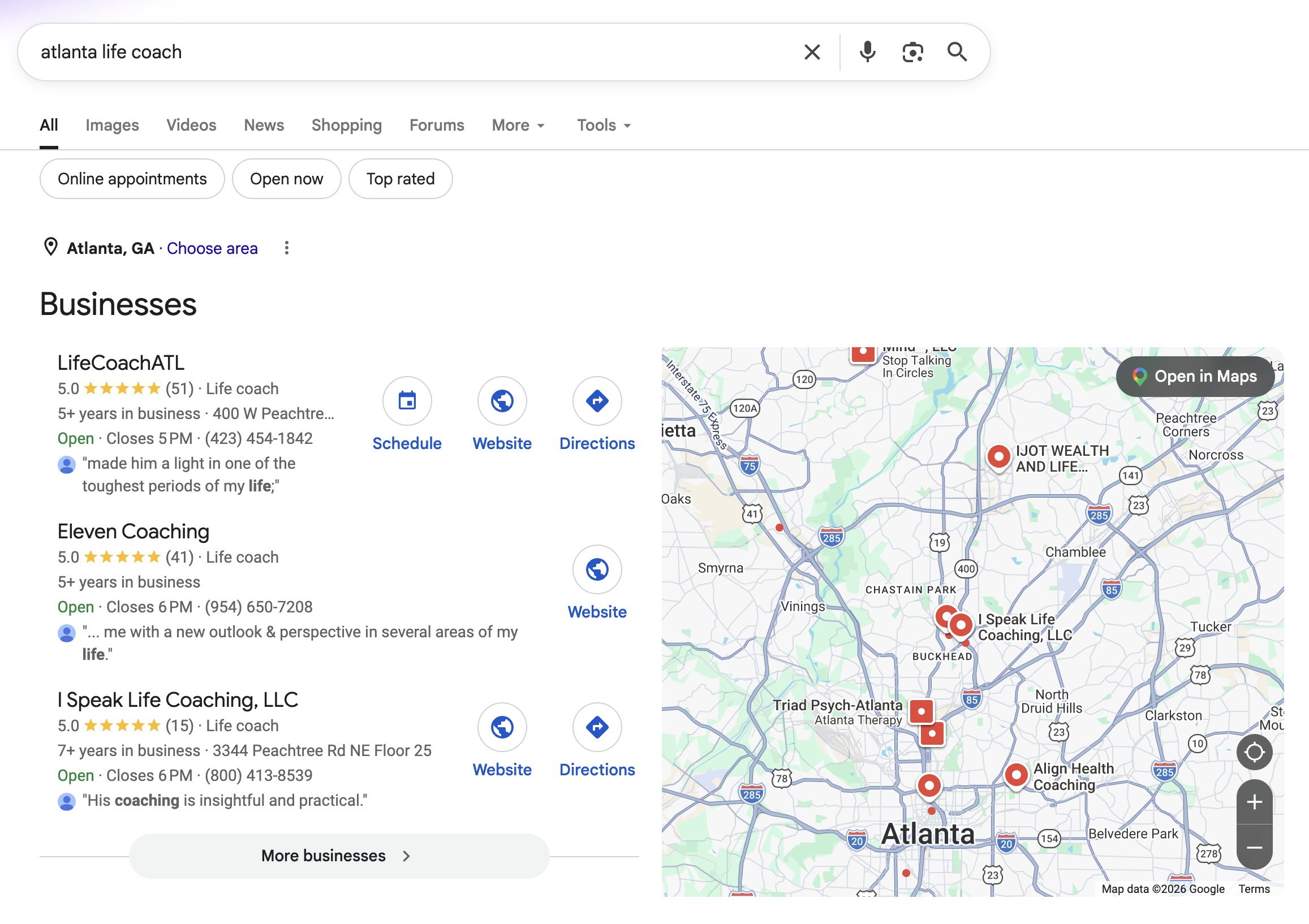
To improve local SEO, consider:
- Including your city or service area naturally in your website content
- Optimizing page titles and headings with location-based keywords
- Creating and optimizing your Google Business Profile
- Adding your business location and contact information to your website
- Encouraging reviews if relevant to your business
If your business serves clients virtually, you can still benefit from local SEO by optimizing for the areas where you primarily work or want to grow visibility.
Local SEO can be a powerful way to connect with the right audience, especially when people are actively searching for services in their area.
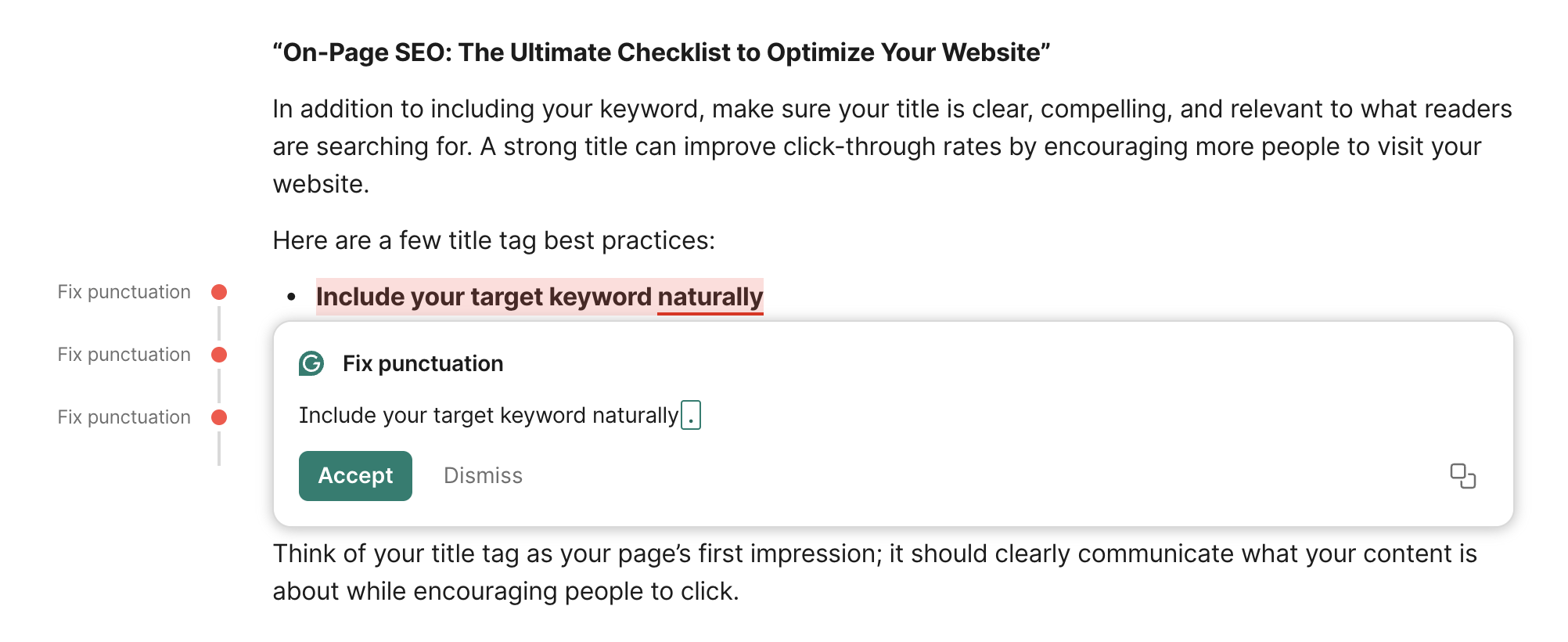
14. Check Grammar and Readability
Great content is not just about keywords; it also needs to be clear, readable, and easy to understand. Poor grammar, spelling mistakes, or overly complicated writing can make it harder for readers to engage with your content and may impact how trustworthy your website feels.
Search engines prioritize content that provides a good user experience, and readability plays an important role in that.
Before publishing a page or blog post, take time to review your content for:
- Grammar and spelling errors
- Clear, easy-to-read language
- Short paragraphs and sentence variety
- Logical structure and flow
- Consistent formatting and headings
To improve readability, try breaking up long blocks of text with subheadings, bullet points, images, or spacing where appropriate. The easier your content is to scan, the more likely readers are to stay engaged.
You can also use tools like Grammarly or Hemingway Editor to help improve clarity and readability before publishing.
Remember, the goal is not to sound overly technical or perfect; it is to create content that is helpful, clear, and easy for your audience to understand.
15. Improve Page Speed and Mobile Experience
Page speed and mobile experience can have a significant impact on both SEO and user experience. If your website loads slowly or is difficult to use on a phone, visitors may leave before they even engage with your content.
Search engines want to provide users with the best possible experience, which means fast, mobile-friendly websites are more likely to perform well in search results.
Here are a few simple ways to improve page speed and mobile experience:
- Compress large images to reduce loading time.
- Use mobile-friendly website design that adapts to different screen sizes.
- Avoid cluttered layouts or oversized elements that slow down performance.
- Limit unnecessary plugins, apps, or heavy animations.
- Test your website on mobile devices to ensure it is easy to navigate and read.
A fast, user-friendly website not only supports your SEO efforts but also helps create a better experience for your visitors, which can lead to more engagement and conversions over time.
Closing Thoughts on On-Page SEO
On-page SEO may feel overwhelming at first, but the good news is that you do not have to optimize everything at once. Small improvements can make a big difference over time.
Start by focusing on the basics: choosing the right keyword, creating helpful content, optimizing your titles and meta descriptions, and improving the overall experience for your visitors. As you become more comfortable, you can continue refining and strengthening your SEO strategy.
Remember, effective SEO is not about trying to trick search engines; it is about creating content that is helpful, relevant, and easy for people to find.
Use this on-page SEO checklist as a guide, take it one step at a time, and keep making progress. Consistency matters more than perfection.
Your future website traffic will thank you.
Want to continue improving your website SEO? Check out our guide to the 7 Best SEO Plugins for WordPress for beginner-friendly tools that can help simplify optimization.